GOOZEEZOO
GOOZEEZOO SV4401A Vector Network Analyzer – 50kHz–4.4GHz, 7" IPS Touchscreen
GOOZEEZOO SV4401A Vector Network Analyzer – 50kHz–4.4GHz, 7" IPS Touchscreen
Couldn't load pickup availability
🚚 Free US Shipping on Orders $100+
GOOZEEZOO SV4401A Vector Network Analyzer – 50kHz–4.4GHz
Explore professional RF measurement capabilities with the GOOZEEZOO SV4401A Vector Network Analyzer. Designed for amateur radio operators, RF engineers, antenna technicians, and electronics enthusiasts, this handheld VNA provides a wide measurement frequency range from 50kHz to 4.4GHz.
Featuring a 7-inch IPS touchscreen, up to 75dB S21 dynamic range, built-in TDR functionality, and a rechargeable 6700mAh battery, the SV4401A combines advanced measurement features with portable operation.
Its N-type RF connectors, integrated storage, and PC connectivity make it suitable for antenna testing, cable analysis, filter characterization, and RF component measurements.
Key Features
Wide 50kHz–4.4GHz Measurement Range
Supports vector network analysis across frequencies from 50kHz to 4.4GHz.
Suitable for testing compatible RF equipment, including:
-
MF / HF / VHF / UHF Antennas
-
Shortwave Antennas
-
WiFi Antennas Within the Supported Frequency Range
-
Bluetooth Antennas
-
GPS Antennas
-
RF Filters and Amplifiers
-
Attenuators and Power Dividers
-
RF Cables, Couplers, and Duplexers
Measurement accuracy depends on calibration, frequency, test connections, and instrument limitations.
S11 & S21 Parameter Measurement
Supports reflection and transmission measurements for evaluating antennas and RF components.
Specified maximum dynamic range:
-
S11: 50dB
-
S21: 75dB
Dynamic range varies with frequency and measurement conditions.
7-Inch HD IPS Touchscreen
Features a 7-inch capacitive IPS touchscreen with 1024 × 600 resolution.
The large display provides clear visualization of measurement traces, markers, and calibration settings.
Four physical shortcut buttons complement touchscreen operation for convenient control.
Comprehensive RF Measurement Functions
Supports multiple measurement displays and analysis functions:
-
S11 Reflection Parameters
-
S21 Transmission Parameters
-
VSWR / SWR
-
Smith Chart
-
Amplitude-Frequency Response
-
Phase-Frequency Response
-
Polar Plot
-
Group Delay
-
Marker Analysis
-
Cable Measurements
These functions provide flexible tools for antenna adjustment and RF circuit testing.
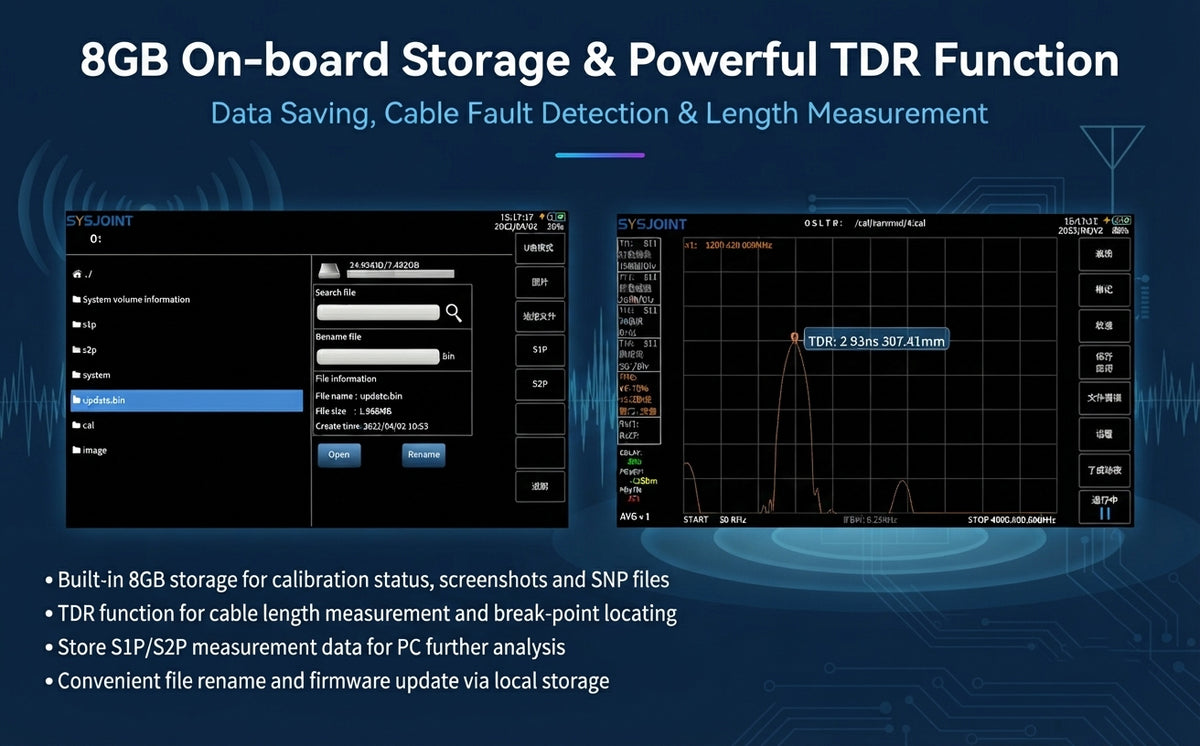
Built-In TDR Cable Analysis
Features Time Domain Reflectometry (TDR) functionality for evaluating transmission lines.
Supports cable length estimation and locating potential impedance discontinuities or cable faults.
TDR accuracy depends on calibration, cable characteristics, and the configured velocity factor.
Fast 400 Points/Second Scanning
Provides a specified scanning speed of up to 400 measurement points per second.
Supports up to 1001 adjustable sweep points for detailed frequency analysis.
Actual scanning speed depends on measurement settings and operating conditions.
Professional N-Type RF Connectors
Equipped with N-type RF connectors for durable RF test connections.
Supports compatible N-to-SMA adapters and SMA extension cables for connecting different RF devices.
6700mAh Rechargeable Battery
Features a built-in rechargeable battery consisting of two 3350mAh cells.
Provides up to 10 hours of operating time under suitable conditions.
Actual battery life depends on screen brightness, measurement settings, and usage.
8GB TF Card Storage
Includes a pre-installed 8GB TF storage card for supported measurement files.
Storage applications include:
-
Calibration Data
-
Touchstone SNP Files
-
Measurement Screenshots
-
Test Records
USB Type-C Connectivity
Features a USB Type-C interface for charging, data communication, and supported firmware updates.
Compatible PC control functions include frequency configuration, real-time data acquisition, and marker adjustments.
Windows, Linux & macOS Compatibility
Supports compatible computer-based control through Windows, Linux, and macOS systems.
The USB interface enables convenient integration with supported RF measurement workflows.
Durable Metal Housing
Features an all-metal enclosure designed to provide structural protection and electromagnetic shielding.
The compact 190 × 130 × 30mm body includes a rear support stand for desktop operation.
Technical Specifications
-
Brand: GOOZEEZOO
-
Model: SV4401A
-
Product Type: Handheld Vector Network Analyzer
-
Frequency Range: 50kHz–4.4GHz
-
Measurement Parameters: S11 / S21
-
Maximum S11 Dynamic Range: 50dB
-
Maximum S21 Dynamic Range: 75dB
-
Display Size: 7 Inches
-
Display Type: IPS Capacitive Touchscreen
-
Display Resolution: 1024 × 600
-
Physical Shortcut Buttons: 4
-
Maximum Scanning Speed: 400 Points/Second
-
Maximum Sweep Points: 1001
-
RF Connectors: N-Type
-
Measurement Functions: VSWR / Smith Chart / Phase / Group Delay / TDR / Polar Plot
-
Battery Capacity: 6700mAh
-
Battery Configuration: 2 × 3350mAh Cells
-
Maximum Specified Battery Runtime: Up to 10 Hours
-
Storage: 8GB TF Card, Pre-Installed
-
USB Interface: Type-C
-
Supported Computer Systems: Windows / Linux / macOS
-
Supplied Firmware Reference: SV6301A_App_v0.7.1
-
Firmware Update Method: Virtual USB Drive, Where Supported
-
Housing Material: Metal
-
Dimensions: 190 × 130 × 30mm
-
Support Stand: Built-In Rear Stand
-
Applications: Antenna Testing / RF Filter Analysis / Cable Testing / RF Component Measurements
Measurement Applications
Antenna SWR & Impedance Testing
Measure antenna reflection characteristics, standing wave ratio, and impedance.
Use Smith chart visualization to evaluate antenna matching and impedance transformation.
RF Filter Characterization
Measure filter insertion loss, frequency response, and phase characteristics using supported S21 functions.
Suitable for evaluating compatible RF filters and duplexers.
Cable Length & Fault Detection
Use the built-in TDR function to estimate cable length and identify potential impedance discontinuities.
Accurate measurements require appropriate calibration and cable velocity-factor settings.
RF Component Analysis
Evaluate compatible attenuators, power dividers, couplers, matching networks, and other passive RF components.
Active devices may require additional protection and appropriate test arrangements.
Installation & Usage Notes
Step 1 – Power On the Analyzer
Charge the built-in battery or connect a compatible USB Type-C power source.
Step 2 – Select the Measurement Range
Configure the start and stop frequencies according to the antenna or RF component being tested.
Step 3 – Perform Calibration
Complete the appropriate calibration procedure using compatible calibration standards.
Calibration should be performed before measurements, particularly after changing the frequency range or test setup.
Step 4 – Connect the Device Under Test
Connect the antenna, cable, filter, or RF component to the appropriate N-type RF port.
Use compatible N-to-SMA adapters or extension cables when required.
Step 5 – Select Measurement Functions
Choose the desired measurement display, including S11, S21, VSWR, Smith chart, phase, group delay, or TDR.
Step 6 – Save Measurement Results
Use the installed TF card to store supported calibration files, screenshots, and measurement records.
Step 7 – Connect to a Computer
Connect the analyzer to a compatible computer using USB Type-C for supported control and data functions.
Important Usage Notes
-
Calibration is essential for meaningful RF measurement accuracy.
-
The specified dynamic range values are maximum figures and may vary across the operating frequency range.
-
The stated 50kHz–4.4GHz coverage does not guarantee identical accuracy or dynamic range at every frequency.
-
Never connect the analyzer directly to a transmitting RF output that exceeds its safe input limits.
-
Use appropriate attenuators and RF protection when testing powered equipment.
-
TDR measurements require correct cable parameters, including velocity factor.
-
Actual battery runtime depends on operating conditions.
-
Firmware updates must match the exact hardware model and revision.
-
The supplied firmware identifier should be verified for SV4401A compatibility before installation.
Frequently Asked Questions
Q: What frequency range does the SV4401A support?
The analyzer supports a specified measurement range from 50kHz to 4.4GHz.
Q: Can it measure antenna SWR and impedance?
Yes. It supports S11 reflection measurements, VSWR, impedance analysis, and Smith chart visualization.
Q: What is the maximum dynamic range?
The supplied specifications indicate up to 50dB for S11 and 75dB for S21.
Q: Does it support TDR cable testing?
Yes. The built-in TDR function supports cable length estimation and locating potential cable faults.
Q: What type of RF connectors does it use?
The analyzer features N-type RF connectors and supports compatible N-to-SMA adapters.
Q: Does it have a touchscreen?
Yes. It features a 7-inch IPS capacitive touchscreen with 1024 × 600 resolution.
Q: How long does the battery last?
The built-in 6700mAh battery provides up to
Share